Showing posts with label Mobile Hacking. Show all posts

Tuesday, 21 January 2014

Original Stock ROM for Galaxy S Duos GT-S7562

The users are running Custom ROM (e.g. KyleOpen ROM) on their device; they have to install the Stock ROM on Galaxy S Duos GT-S7562 to get the device warranty back!
Original Stock ROM for Galaxy S Duos GT-S7562
Today, in this article we will provide you the Original Stock ROM for Galaxy S Duos and also the method to install it. Surely, we will help you to get back your Official Stock ROM on Galaxy S Duos, just you have to follow the steps carefully. Firstly, read the whole post intensely and at some point if you feel that you are not able to understand any step then immediately shoot a comment via below comment box!

Things to be checked before installing Stock ROM on Galaxy S Duos

  • Do charge your device battery upto 70 – 80% to avoid trouble.
  • Take a full backup of your device in an external SD card.
  • Don’t forget to enable ‘USB Debugging’ (Navigate to Menu > Settings > Manage Applications > Development > USB Debugging – check box), otherwise your device will be handicapped.
  • Install Samsung Galaxy USB Drivers from here or download “Moborobo” Tool.

Files to be downloaded to install Stock ROM on Galaxy S Duos

Note: You have to download ROM file according to your baseband version of your device. To obtain the baseband version, navigate to ‘Menu > Settings > About’ and check it.

Procedure to install Stock ROM on Galaxy S Duos

1. At first, make sure you have installed the drivers correctly by connecting your device.
2. Download all the necessary files from the above links.
3. Now, Switch Off your phone completely and start your device into Download Mode by pressing and holding the ‘Volume Down + Home button’ together, and then press the ‘Power button’ till you see the Android Construction logo. Once again press ‘Power Up’ button to confirm.
4. Open “Odin.exe” (downloaded earlier) and connect your phone in download mode itself. If your phone is connected successfully the one of the ID:COM boxes will turn yellow or green in color.
5. Select the files as per below instruction to install Original Stock ROM on Galaxy S Duos. Files are found to be from the extracted folder.
  • Click on “PDA” and select file with “CODE” in its name.
  • Click on “Phone” and select file with “MODEM” in its name. (Note: Ignore this step if you don’t able to find such file)
  • Click on “CSC” and select file with “CSC” in its name. (Note: Ignore this step if you don’t able to find such file)
  • Click on “PIT” and select “.pit” file. (Note: Ignore this step if you don’t able to find such file)
6. Please make sure that only F. Reset Time and Auto Reboot options are checked on Odin. Don’t check any other boxes. (Note: Check Re-Partition box if you have selected “.pit” file)
7. Now, click on the “Start button” on Odin to start the installation process. Installation will take a few minutes to complete, so please wait for the complete process.
8. Finally, when the installation process is completed successfully you will see the “PASS” message on Odin and then your device will reboot automatically. Now, you can disconnect your device from the computer.
Congratulations! Now, you are on Stock ROM and your device warranty is back without any cost.

Monday, 20 January 2014

Flash Samsung galaxy Core GT-I8262 With Origional Stock ROM(India)


This tutorial shows you how to Flash stock Firmware using Odin on Galaxy Core Gt-i8262

Requirements :--->

1. ODIN 3.07
2. Samsung USB Drivers 
3. Stock firmware
download from post 2
4. Official USB cable
5. Ofcourse Galaxy core 

note :-> click on above requirements to download
Flashing Tutorial :-->

DON'T FORGET TO PRESS THANX BUTTON FOR MY HARD WORK

1. Install usb drivers on pc....
2. reboot ur pc 
3. Download the ODIN 3.07 & save it in your PC and extract its content to Desktop.
4. Download the update firmware.zip && save it in your PC and extract the update file on your Desktop.
5. Now, turn off your Samsung Galaxy Core 
6. Boot your Galaxy Core into the Download mode by pressing [ Volume down + Menu + power ] buttons on the same time and connect USB cable.


7. now ur phone will boot into download mode ........u will see a "WARNING" 


8. now press "VOLUME UP" button to enter into download mode :--> 

9. Now open "ODIN 3.07.exe" on desktop & attach ur phone to ur pc using stock usb cable.

10. When the connection is established with odin , u will be notified with the “added” message that will be displayed on the Odin interface, the ID:COM section should be colored on yellow or blue.

11. click on PDA button && select the Gt-i8262XXXXXX_i8262XXXXXX_XXXHOME.tar u extracted on desktop [file name may differ ]

12. now click on "START" button & it will take 10 minutes to flash the firmware ....

Note:-> DON'T interrupt the flashing process, it may brick ur device [ soft or hard brick]

13. U will see a "PASS" & "RESET" on ODIN application...

14. Ur phone will reboot automatically & u should be booted successfully ....

15. enjoy  [ u have flashed stock firmware successfully on ur device ].

Tuesday, 12 November 2013

Flash Official Firmware on Samsung Galaxy Ace S5830i Using Odin


Samsung Galaxy Ace S5830i is one of the most popular and best-selling low-end Android smartphones with nice features. The phone was released with Android 2.2 (Froyo) and was later upgraded to version 2.3.6 Gingerbread. Modest specs of the this handset make it unqualified to be updated to Ice Cream Sandwich or Jelly Bean but there are qualified and skilled developers out there who have successfully, but not buglessly, developed custom ROMs and mods to give you some ICS and JB flavor.
If you have recently tried a custom ROM and now want to go back to original Gingerbread ROM, you can install it manually. Sometimes the device does not start properly because it is caught in a bootloop and you can only see the Samsung logo with your device name. In such a situation, installing the official ROM is the best solution.

Download Firmware

Here are some multi-file firmwares for the Samsung Galaxy Ace s5830i. Below you will find the link to download single file firmwares.
You can also download single file firmware file for you country or region and install it as directed below. To download firmware for your Galaxy Ace S5830i, click here.

Getting Prepared

  • Download appropriate firmware file from above and extract the zip to your desktop computer.
  • Download Odin3 1.84 tool for multi-file installation (extract zip): Odin_with_pit_S5830I.Zip
  • Download Odin3 v3.07 for single file installation  (extract zip): Odin3-V3.07.Zip
  • Download and install Samsung USB Drivers on your PC: Download
  • Charge your phone and backup all essential data such as contacts, messages, apps using These Free Apps.
  • Open phone Settings> Applications> Development and enable USB Debugging.

Installing Stock Gingerbread Firmware

Turn off you phone and boot it into Download mode: hold down the Volume Down + Volume Up  buttons, then long press the Power key till the your phone’s screen turns up and you see the Download mode screen.Now on next menu click vol up button to enter download mode:
NOTE:: PLEASE INSTALL SAMSUNG KIES FIRST.OTHERWISE ODIN WILL NOT SEARCH YOUR DEVICE
Single File Installation:
  1. If you are going to do a single file installation, launch Odin3 v3.07.exe as administrator and connect the phone to computer via USB cable.
  2. When the device connections is established successfully the ID:COM port at Odin 3.07 turns blue.
  3. Click on PDA button and select the firmware file with .tar.md5 extension.
  4. Do not mess with any other thing in Odin and click the “Start” button.
Multi-file Installation:
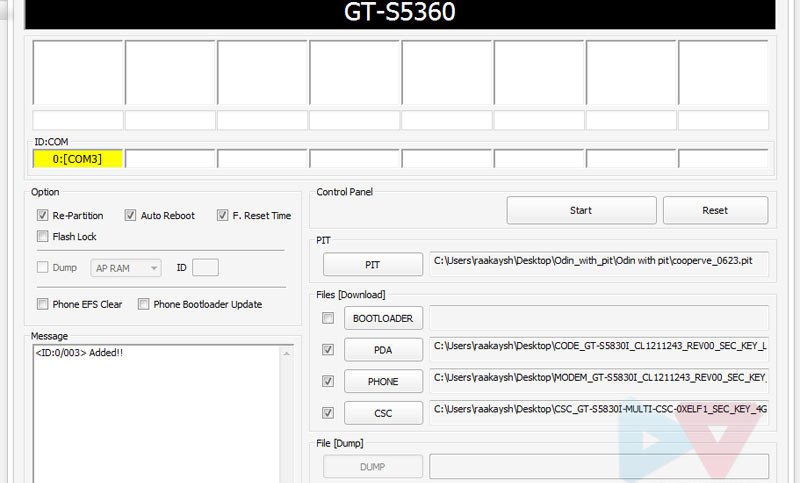
  1. In case you choose to install a multi-file firmware, run Odin3 1.84.exe as administrator and connect your phone to PC while it is in Download mode.
  2. When the device is connected, the ID:COM will turn yellow.
  3. Make sure that “Re-Partition”, “Auto Reboot” and “F Reset Time” options are checked on Odin.
  4. Now click on PIT button and select the .pit file: cooperve_0623.pit
  5. Then click the PDA button and select the file with CODE in its name.
  6. Click Phone and select the file with MODEM in its name.
  7. Click on CSC and select the file with CSC in its name.
    ODIN-S5830I-multi-file-flashing
  8. Finally hit the “Start” button on Odin and let the installation finish.
The installation will take just a few minutes and when it is done your phone will reboot automatically. The first boot usually takes longer time so a little patience is required. When the phone boots, check the firmware version from Settings> About on your Galaxy Ace S5830i. Enjoy the new firmware. Cheers!

Thursday, 26 September 2013

Mobile Number Cloning : How To Clone A Number


The Ultimate Tool to spy on somebody is in every everybody's pocket ! The Modern Engineering marvel aka Mobile Phone's are everybody's need. People often (mostly) do their confidential talks over cell phone's, But only some know how easy it is to eavesdrop them. There are some tricks and hacks to do that, but the most powerful way is to clone their SIM Card. The Subscriber Identity Card aka SIM Card is the transmitter of signal to the mobile and tower, And you can do It easily.

So What Can You Do When You Clone SIM card ?


Well There are many things to do when you clone a SIM Card, You can secretly spy on the victims calls and data transfers, make him mobile bill go crazy, send messages and make calls from his number, All without touching the victims Cell Phone.


First A Little Knowledge Of SIM Hacking :


Not every SIM Card is clone-able, There are two types of SIM Card :

COMP128v1: The most popular and clone-able version of SIM Cards, Distributed widely till 2004 in USA (2007 In ASIA Countries), Of the number of victim is older than 2004 in USA or 2007 in Asia, Chances are you can clone it pretty easily.


COMP128v2: The newer SIM's, Capable of better 3G Reception, Video Call Support, New and Secure firmware, Complex Design, Very ( I mean very fu*king very) Hard. If the SIM is bought after 2004, it is probably this version.

Things Required :

A SIM Firmware Writer : Buy It From www.ebay.com

Or Make your own SIM Writer : CLick Here

The Victim's SIM For 15 minutes to 30 Minutes !

So The inventory is full, Lets Begin The Work :

The main mission in cloning a SIM Card is to get KI and IMSI codes, these codes are the identifier of the SIM Card, and help you register your mobile to the network. 

The Step 1 :

Plug in the SIM Reader, Install the software, get the vic's SIM.

Step 2 :

Configure the Software as shown in the below pictures :

Step 3 :

First Run The IMSI Search :

Real Hackers Point, Spoof A Number
Note Down The IMSI Number !

When the results come, write them down. Then start the ICC Search :

Note This Value Down Too.

Write down the ICC Number too, Now run the KI Search, This may take some time :
Real Hackers Point
After 45 Minutes, IF you don't Get the First Value, The Sim IS Un-cloneable !


Now remove the Vic's SIM And give it back to him.

Step 4 :

Download SIM-EMU, A software to write settings on Blank SIM Card.
Now insert the blank SIM and wait for it to detect.

Step 5 :

Run SIM-EMU and click the configure tab, 

Enter the ALL the Info Gathered from the Woron Scan Process: IMSI, KI, ICC.

Real Hackers Point : Clone A SIM Card !
The Setup Menu

For the rest Info :
For ADN/SMS/FDN# (ADN= Abbreviated Dialing No. / SMS = No. of SMSes stored on SIM / FDN = Fixed Dialing No.) Enter: 140 / 10 / 4 OR if the Program has suggested values, let it remain as it is.

The Phone Number should be in International Format, EG: For India +91(the international code) 9999999999 (the number)

Step 6 :

Let The Writing Begin, Select the Write To Disk button and Name the File: SuperSIM.HEX.

Real Hackers Point
Wait For The Conformation, Then Select OK.


A write EEPROM file window will appear. Name the EEPROM file SuperSIM_EP.HEX and click the Save button.

Real Hackers Point
Now You Have 2 Files, Ready to be Flashed.


Step 7 :

Now We Flash the files on Blank SIM Card  :
Install the card that came with the card writer, cause using any other software will fu*k up your card and your reader.

Our Card Readers Software was Infinity USB Unlimited, The interface can be changed in your software, but the functioning is the same. 

Now Put the required files in the appropriate fields :

Hacking Mobile
Flashing The Blank SIM.

Step 8 :

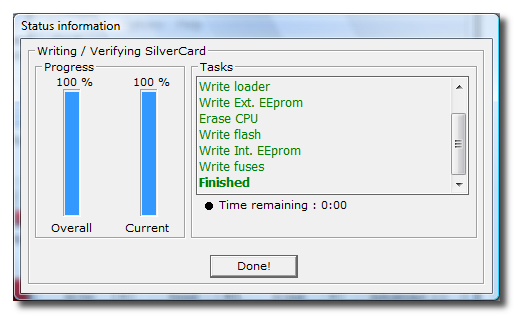
Now run the writing task, Click on done when it has completed.

Congrats, You Have Cloned A SIM Card ! 


So here you have it, A Cloned SIM Card, Now when somebody calls the victim, Both of the mobiles will ring, same will happen in the case of SMS, But only one can pick up the call. Also don't do something big that will raise a red flag in Mobile Company.

Friday, 20 September 2013

How to Make your Nokia Symbian Phone a Wi-Fi Hotspot


So do you want to use your Nokia phone as Wi-Fi Hotspot so that you can access internet on different laptops and other portable devices through your mobile phone than tune into this post because we are going to show you how you can make your Nokia Phone into a Wi-Fi Hotspot. 
JoikuSpot is an awesome application for mobile phone which makes your Nokia Phone a Wi-Fi Hotspot. So that you can use its 3G connection with you laptop or other wi-fi enabled device.

JoikuSpot has three version 2012, premium and light version tats available for free. The free version comes with some limited version bundled to it but still for free you can easily convert your 3G mobile connection and stream it through Wi-Fi. Well it’s a good + free app which you will surely like so have fun and enjoy Symbian lovers. 

How to use Mobile Camera as PC Webcam - Android - Symbian


Online chatting has been redefined with the video chat technology and more and more webcams are taking birth introducing new and vast technology, well but side by side webcams are somewhat expensive and can do only one task live streaming you to your friends and family members. Well if you wanna save your money and side by side want the same webcam experience, you can convert your mobile camera into PC webcam with small apps and tools easily. 
Well we have three best options tat work universally on every platform, so we are going to use Smartcam as our first source, Mobiola web camera and the second source and the third one is specifically for android that’s iP webcam.

smartcam package
#1. Smartcam Package :

Smartcam Package simply provides an easy to install option for your all devices, Symbian, Android, iPhone and connect them as a webcam for your pc.
  1. Download Smartcam Package and extract it in your pc, it’s a simple zip package so just right click and choose extract.
  2. Now it contains a .exe file for your computer and applications for your android device, Symbian device and iPhone. You can use the one in package or you can download them online for newer versions.
  3. Now after you have installed on both devices just fire it up using Bluetooth or USB connectivity and follow instructions and you will be live streaming your mobile camera video as PC webcam.

mobiola web camera
#2. Mobiola Web Camera :

Mobiola Web camera is available for iOS Devices, Blackberry, Symbian but its nor free and you have to pay little cost to get that app running.
  1. Purchase Mobiola Web Camera software or download as trial version.
  2. Now juts install app on your device after purchasing their device application.
  3. That’s it now follow instructions and start chatting with your friends.

ip webcam android
#3. iP Webcam for Android Devices :

iP Webcam for Android is simple application fro converting your Android Device into a wireless PC Webcam. This free application can be installed right into your pc and can used just by a simple iP (internet protocol address).
  1. Download iP Webcam Android App.
  2. Install the application on your phone and connect to the same Wi-Fi network connected to your PC.
  3. Now just follow the instruction on your app and you will be able to connect your device camera with your PC and use it as a webcam.
So now these were the three easy options fro converting your device camera into a simple and free PC webcam. So no investment but still the same fun of video chatting is continued. Have fun and do comment.

How to Find Your Lost Phone [F-Secure Anti-Theft]


Anti-Theft mobile application from F-Secure protects your mobile from getting lost or getting stolen. The best part about this application is that its totally free to download officially from F-Secure. So its extremely easy to install you just need to download it to your PC and then transfer it to your mobile or you can directly download it on your mobile by going to http://f-secure.mobi if you wanna download it on your PC according to your mobile phone version you can download this application from here.

Turn Your Cell Phone Into Jammer

Make Your Own Cell Phone Jammer
 I have managed to build my own cell phone jammer, at last! And now you can do the same.

Steps

  1. Working Principles. This cell phone jammer operates at GSM800 frequency since most mobile phones use it to operate. So the selected VCO is a sweeping oscillator, which is very effective but may be hard to construct for the beginners without nice RF-testing equipment.
    As a noise source you can use 45MHz clock oscillator which is driving Local Oscillator port located on a mini-circuit mixer. There is also an impedance matching network for Local Oscillator signal to pass through it. It is used to equate impedances of the clock oscillator and the port of the mixer.
    RF input (which is this port of the mixer) connected to the first 800MHz cell phone antenna, and the RF output is sent to the mini-circuit amplifier. This amplifier increases the output power for 15-16dbm. The amplified signal then sent to the second cell phone antenna.

  2. How It Works? All cell phones which use GSM800 have their transmitted and received frequencies alwaysseparated by 45MHz. So when the mobile phone tries to call it is blocked by its own signal returning to it! Isn’t that cool? When the phone blabber annoys you – turn your jammer on and that wrongdoer will hear own voice in his or her cell phone.
    Oh, by the way, you can also use this mobile signal jammer to block any cell-based tracking systems which use your GPS to track and record your car’s moves. And it is quite possible (though I didn’t actually tested it) to jam IEDs which detonated using cell phones.

  3. Pics And Notes.

    Circuit Board
      
    Circuit Board

    The mixer I used is designed to work up to 600MHz but in this case it works pretty well.

    Circuit Board from top


    Circuit Board from top

    RF amplifier is doing its job perfectly yet (as it was mentioned in the Jammer Store blog post) draws additional power.

    Case and Connectors


    Case and Connectors

    Old aluminium box was used as a frame for the jammer and old UHF connectors from Motorola cell phone as input/output.

    Attached UHF Connectors


    Attached UHF Connectors

    You need to attach RF connectors to the circuit.

    Cell Phone Jammer Inside
      

    Cell Phone Jammer Inside

    Nine volt battery and voltage regulator were used to supply all components. The battery was placed inside and separated by the foamed plastic from the other components.

    Finishing Strokes


    Finishing Strokes

    The power on/off switch is placed on the top. The input and output antennas (also from old Motorola mobile phone) are screwed onto UHF connectors.

    Ready to Rock'n'Roll!


    Ready to Rock'n'Roll!

    Your cell phone jammer is ready. Enjoy!
4. Scheme

Cell Phone Jammer Scheme
  

Cell Phone Jammer Scheme
  
Video