Showing posts with label Windows Hacking. Show all posts

Sunday, 16 February 2014

Windows 7 Activator/Loader For Any Version 100% Working


Windows 7 is an operating system produced by Microsoft for use on personal computers, including home and business desktops, laptops, netbooks, tablet PCs, and media center PCs.
                                   
  It was released to manufacturing on July 22, 2009,and became generally available for retail worldwide on October 22, 2009 less than three years after the release of its predecessor, Windows Vista. Windows 7's server counterpart, Windows Server 2008 R2, was released at the same time. Windows 7 is succeeded by Windows 8.
                   Download Loader/Activator Here
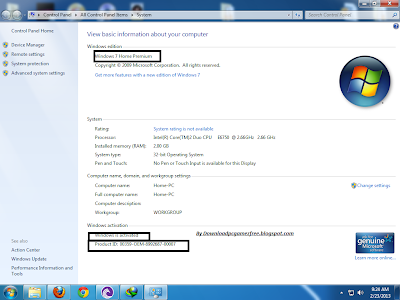
Loader Screen Shots:


Monday, 20 January 2014

A Basic Hack Attack To Windows 7 Using Metasploit

Windows 7 is an operating system produced by Microsoft for use on personal computers, including home and businessdesktops, laptops, netbooks, tablet PCs, and media center PCs. It was released to manufacturing on July 22, 2009, and became generally available for retail worldwide on October 22, 2009, less than three years after the release of its predecessor, Windows Vista. Windows 7's server counterpart, Windows Server 2008 R2, was released at the same time. Windows 7 is succeeded by Windows 8.

This tutorial shows how to perform Hacking Windows 7 Using Backtrack's Metasploit.
                            Click To Download Tutorial

Friday, 27 September 2013

How to Hack the Windows Admin Password Using OphCrack in Backtrack tutorial

In this post, i am going to help you to crack the any type of windows accounts passwords. Learn how to hack the windows admin password like a geek.


Requirements:
  • BackTrack Linux 4 or 5. Download it from http://backtrack-linux.org
  • One pen drive(above 4gb)
  • Xp Free Fast RainBow table [tables_xp_free_fast.zip]. Download it from here:http://ophcrack.sourceforge.net/tables.php 
*Install the Backtrack Linux in the pen drive with small amount of persistent memory.

Step 1: Booting From Back Track 
Insert the pen drive in target computer[when turned off].  We are going to boot the operating system from pen drive, so insert when the system is turned off.
Now Turn on the system. 
Press F10 [boot menu, differs for system]  before booting and select boot from Pen drive.  
Now it will boot the Backtrack. 
Select "Graphical User Interface "
Now wait for a while ( it will execute some commands}
Now you can see the "root:" 
type "startx" and hit enter.  It will bring you to the GUI view of Backtrack.

Step 2:Copy the SAM and System files
Click the  Start button(dragon symbol)
Select System Menu
Select Storage Media(if you see nothing, close the window open it again).

You can see the list of Hard disk and Your pen drive.
Open the windows installed Hard disk and Navigate to this path:
WINDOWS/system32/config/

There you can see two files named as "SAM" and "System".  

Copy the both SAM and system files .
[ Just proceed to next step without closing the window]

Create a new folder in the desktop and paste the files inside.

Step 4: Run OphCrack Tool in Backtrack
Open the ophcrack GUI(start->Backtrack->Privilege Escalation->Password Attack->offline Attacks-ophCrack GUI).

Step 5: Loading the folder that contains sam and system files

Click the Load and select "Encrypted SAM" in ophcrack tool.
Now it will ask you to select directory that contains SAM folder. Select the directory where you saved the SAM file.

Now it will load and display the list of user accounts in the windows.

Step 6: Target the Admin Account
Here i am going to hack the one of the administrator account of my computer. So remove all other accounts except the target admin account.

Step 7: The Rainbow Table

Extract the "tables_xp_free_fast.zip" file in the desktop.


Click the Table button in ophcrack tool. Now it will ask you to selec the table.  Select the "XP free fast" and click the install button. Now browse to the Rain bow table directory "tables_xp_free_fast"
Now click ok.

Step 8: Cracking Begins
Click the Crack button.
Wait for a while [ophcrack is the fastest cracking tool. so it won't take too much time]

Step 9: Password is cracked
Yes..!! we got the password. 

Thursday, 26 September 2013

Hacking Windows 8 By Metasploit Tutorial

So as you have heard, New version of Backtrack was released last month, Dubbed as Kali Linux, This edition brought many changes in the Backtrack OS, for more details, Click Here. 
We haven't done a Hacking tutorial in some time, So here you go, Our First Kali Linux Tutorial, Using our favorite tool "Metasploit" we will now create a Java Signed Applet, which will enable us to control the victims PC, use his webcam, see whats on his screen, tap their key strokes and much more.
So Let's Begin :


What Do You Need For This Attack :

# Kali Linux "Backtrack 6" : Get It Here.
# Metasploit On it . (tutorial below)
# A Victim using Windows 8.
# Brains And Balls !

KALI Linux And Metasploit :
Kali Linux, This evolved version of our lovely Backtrack, Is a Linux Distro Specially Created For Hackers, By Hackers. You will find 1000+ Tools in it which are capable of SQL Injection, IP Smurfing, IP Scanning, Password Cracking And more. It is based on Debian, Which is known as the most tested and most solid base for any Operating systems.It Has a very big software library and it is pretty easy to Use. 
BEST THING :Its Open Source.
Metasploit is a security penetration tool,Based on Metasploit framework, and if you have viewed our previous post, you might have an idea how to use it. Metasploit was buggy-as-hell in backtrack, but i'm happy to tell you it has completely changed its libraries and is now smooth as silk on Kali.

Steps To Perform This Attack :

#1 - Launching Metasploit On Kali Linux :

So I Assume you have Kali Linux running on your PC, doesn't matter if its on a Live CD, USB, Or Installed.
So Now you need to open the terminal and type this :

msfconsole

Give it a sec, and after it has loaded, type (or copy/paste) this command :

use multi/browser/java_signed_applet

It would look something like this picture below :

By Java
Click To Enlarge.

#2 - Setting Port Numbers :
So you know we need an active port on both victim pc and out computer, so that our computers can talk to each other.In this version, this port is called SRVPORT, and we can set it by :

set SRVPORT [Port number]

it is by default 8080, but i have set it to 1020, you can set it to anything you want.

Now to change the path to the exploit, we can set the URIPATH to anything we want. We can leave all the settings as it is, but it will look a little bit ugly, And ugly is bad for hackers, we want our thing to look like a diamond, so that everybody wants it. So to do it we will type this command now :

set URIPATH /

#3 - Verifying if it is done correctly :

You don't want any errors, trust me, so why don't you look at all the command you have typed.

#4 - Launching the exploit :

After checking everything, we will type this command and this will launch our exploit :

exploit

now all you have to do is send the IP to the victim, and get one click on it, The BAZINGA, you have hacked his PC.

Of-course he will see a warning like this :


but you can get past it, can't you guys .

#5 - Welcome To His System :

Now you have opened a meterpreter to the victims PC, and if you search Google for some powerful commands, you can erase/delete/corrupt/shut down/reboot/steal his files/passwords etc . So use it carefully.

Wednesday, 25 September 2013

How to get the Windows product key without using third party software

If you lost, cannot retrieve or forgot where you had stored the product key of your Windows 8.1, Windows 8 or Windows 7 OS, do not despair. I would like to show you a simple solution to extract your product key from the OS installed on your PC without using any third party software.


  1. Open Notepad.

     2. Copy and paste the following text into the notepad window 


function Get-WindowsKey {
## function to retrieve the Windows Product Key from any PC
## by Jakob Bindslet (jakob@bindslet.dk)
param ($targets = ".")
$hklm = 2147483650
$regPath = "Software\Microsoft\Windows NT\CurrentVersion"
$regValue = "DigitalProductId"
Foreach ($target in $targets) {
$productKey = $null
$win32os = $null
$wmi = [WMIClass]"\\$target\root\default:stdRegProv"
$data = $wmi.GetBinaryValue($hklm,$regPath,$regValue)
$binArray = ($data.uValue)[52..66]
$charsArray = "B","C","D","F","G","H","J","K","M","P","Q","R","T","V","W","X","Y","2","3","4","6","7","8","9"
## decrypt base24 encoded binary data
For ($i = 24; $i -ge 0; $i--) {
$k = 0
For ($j = 14; $j -ge 0; $j--) {
$k = $k * 256 -bxor $binArray[$j]
$binArray[$j] = [math]::truncate($k / 24)
$k = $k % 24
}
$productKey = $charsArray[$k] + $productKey
If (($i % 5 -eq 0) -and ($i -ne 0)) {
$productKey = "-" + $productKey
}
}
$win32os = Get-WmiObject Win32_OperatingSystem -computer $target
$obj = New-Object Object
$obj | Add-Member Noteproperty Computer -value $target
$obj | Add-Member Noteproperty Caption -value $win32os.Caption
$obj | Add-Member Noteproperty CSDVersion -value $win32os.CSDVersion
$obj | Add-Member Noteproperty OSArch -value $win32os.OSArchitecture
$obj | Add-Member Noteproperty BuildNumber -value $win32os.BuildNumber
$obj | Add-Member Noteproperty RegisteredTo -value $win32os.RegisteredUser
$obj | Add-Member Noteproperty ProductID -value $win32os.SerialNumber
$obj | Add-Member Noteproperty ProductKey -value $productkey
$obj
}
}


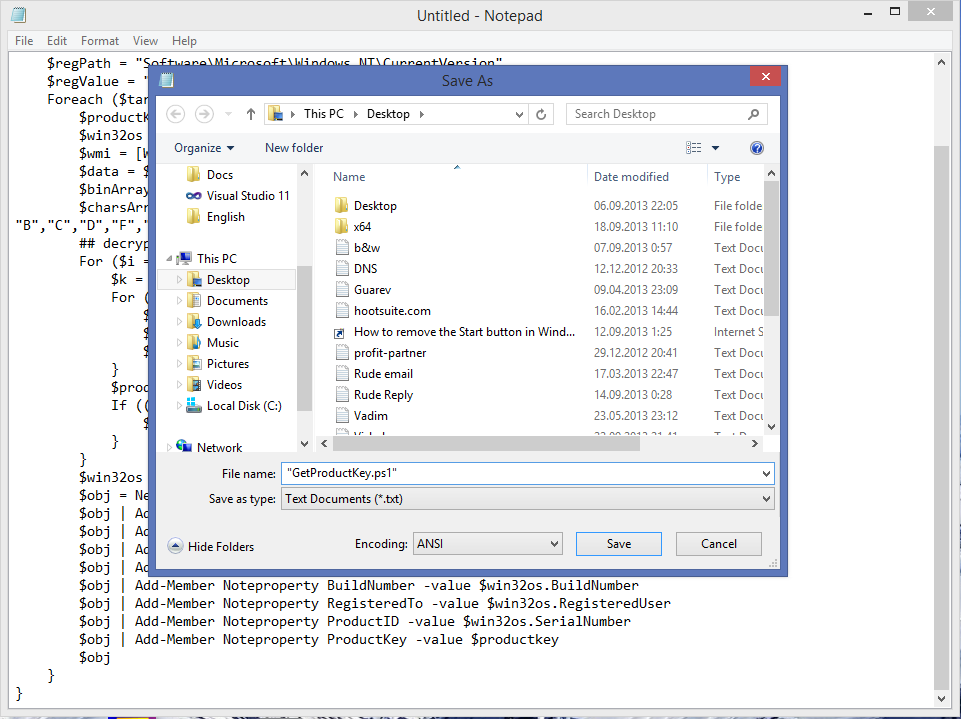
  • Save the text above into a file with the ".ps1" extension on the Desktop.

    Bonus tip: To make sure that you saving the file with the ".ps1"
    extension, you can type its name with double quotes, for
    example, "GetProductKey.ps1".

    get product key


  • Open the Powershell console as administrator by typing "powershell"
    in the search box of the Start Menu or right on the Start Screen and
    then press CTRL+SHIFT+Enter. This will open the elevated Powershell
    window.


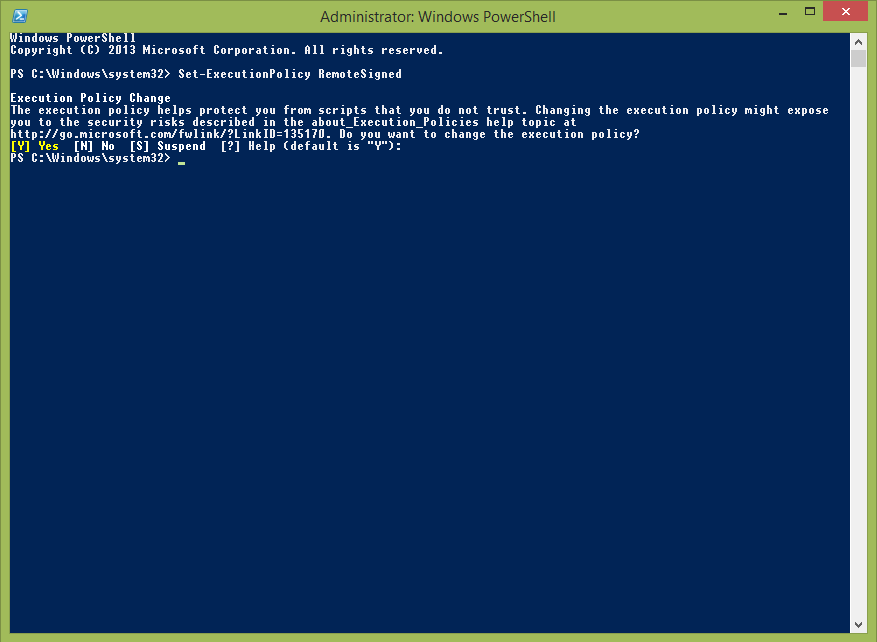
  • Enable the execution of local files which are not digitally signed. This can be done with the following command:
    Set-ExecutionPolicy RemoteSigned
    Press Enter to allow the execution policy to be changed. Windows PowerShell
  • Now you should type the following command:
    Import-Module C:\Users\Winaero\Desktop\GetProductKey.ps1; Get-WindowsKey
    Note: Change the path to the GetProductKey.ps1 file in the command above, according to the location where you saved it.
  • Voila, you product key is displayed on the screen!
  • Get Product Key
  • Wednesday, 18 September 2013

    To Remove Recyle Bin From Your Desktop


    If you dont want to see recycle bin on your desktop then follow simple steps as follows:

    1. Open Regedit by going to START - RUN and type Regedit and hit enter. 


    2. Then you should navigate to following entry in registry HKEY_LOCAL_MACHINE\SOFTWARE\Microsoft\Windows\CurrentVersion\Explorer\ Desktop\NameSpace\{645FF040-5081-101B-9F08-00AA002F954E} and delete it.

    3.  This action should remove recycle bin from your desktop.

    Trick To Lock Hard Disk Drives In Computer

    We don’t usually prefer to lock our drives, but sometimes it becomes nesscary. Say for instance you might have stored your office documents in D:\ and you don’t want your kids to access it, in such case this technique can be useful for you. Please don’t try this tweak with your root drive (usually C:\ is the root drive) since root drives are not intended to be locked because they are mandatory for the system and application programs.
    • Start & Run and type Regedit to open Registry editor
    • Browse HKEY_CURRENT_USER\Software\Microsoft\Windows\Curre ntVersion\Policies\Explorer
    • Create a new DWORD value NoViewOnDrive and set its value as
    2^ (Alpha Number of Drive Letter-1) where Alpha number are simple counting of alphabets from A to Z as 1 - 26
    For example: to lock C:\, Alpha number of C is 3 so 2^ (3-1) = 4 (decimal value)
    • To lock more drives, calculate the value of each drive and then set sum of those numbers as value
    • To unlock your drive just delete the key from the registry.

    Locking Folders Without any Software


    • Consider you want to lock a folder named XXXX in your E:\, whose path is E:\XXXX.
    • Now open the Notepad and type the following
    [code]ren xxxx xxxx.{21EC2020-3AEA-1069-A2DD-08002B30309D}[/code]
    • Where xxxx is your folder name. Save the text file as loc.bat in the same drive.
    • Open another new notepad text file and type the following
    [code]ren xxxx.{21EC2020-3AEA-1069-A2DD-08002B30309D} xxxx[/code]
    • Save the text file as key.bat in the same drive.
    Steps to lock the folder:
    • To lock the xxxx folder, simply click the loc.bat and it will transform into control panel icon which is inaccessible.
    • To unlock the folder click the key.bat file. Thus the folder will be unlocked and the contents are accessible.

    Fix Windows XP Corrupted System Files Easily


    Do you suffering from bad files in your windows xp which slow down your system>>????
    If yes, here is the solution to repair Windows XP corrupted system files. Follow simple steps as follwos: 

    1.Load XP cd into cd drive

    2. go to Run

    3. type sfc/scannowok

    4. Then copy its lost file frm cd. 

    Increase the speed of your file sharing


    Here Is a simple windows trick to simply share and boost sharing speed over network:

    Simple Way to Share Multiple Folders :

    Goto Run and Type SHRPUBW.EXE then press Enter

    Select the folder you want to share and Set permissions, 

    your share folder is ready now.....